
Screen guide · Web app
Dashboard
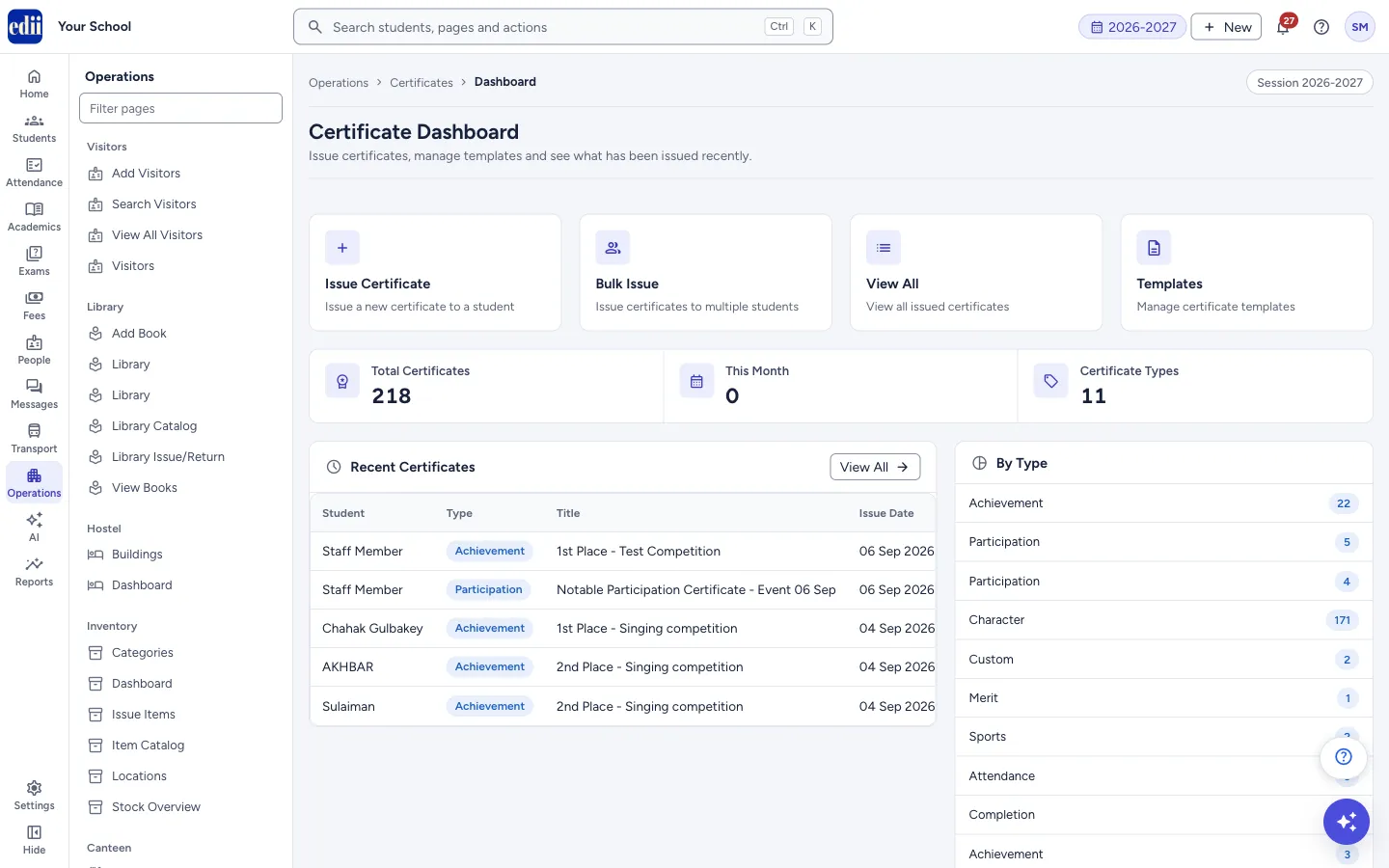
The Certificate Dashboard: shortcuts to issue, bulk issue, view and templates, counts of issued certificates, the five most recent ones and a count by type.
यह पेज अंग्रेज़ी में है। कुछ समझ न आए तो ।
Dashboard (the page heading is Certificate Dashboard) is the starting page of the certificate module. At the top are four large buttons: Issue Certificate, Bulk Issue, View All and Templates.
Below them are three counts, the Recent Certificates table, the By Type list and the Available Types list.
The page is shown only when the school has the Certificates module switched on.
Who uses it and when
Section titled “Who uses it and when”The school office or the class teacher’s desk, to give a merit, participation, achievement, attendance or character certificate and to see what was given lately.
Where to find it
Section titled “Where to find it”- In school.edii.in: Operations › Certificates › Dashboard
- Or press Ctrl K (⌘ K on a Mac) and type Dashboard.
- Address:
school.edii.in/certificate/dashboard - Who can see it: Shown only when your school uses Certificates in EDII. If it is missing from your menu, ask your school admin.
 Open a bigger pictureतस्वीर बड़ी करें
Step by step
Section titled “Step by step”1. Choose what to do
Section titled “1. Choose what to do”Issue Certificate gives a new certificate to one student. Bulk Issue gives certificates to many students at once. View All opens the list of all issued certificates. Templates opens the certificate templates.
2. Read the counts
Section titled “2. Read the counts”Total Certificates is the number of certificates issued. This Month is those issued in the current calendar month. Certificate Types is the number of different types that appear in the issued certificates.
3. Check what was issued lately
Section titled “3. Check what was issued lately”Recent Certificates shows the 5 latest certificates with Student, Type, Title, Issue Date and Serial No. Select a row to preview that certificate. View All opens the full list. If nothing has been issued, EDII shows No certificates issued yet and Issue First Certificate.
By Type shows how many certificates were issued of each type. Available Types lists the certificate types you can choose when issuing.
Buttons
Section titled “Buttons”| Button | What it does | What happens next |
|---|---|---|
| Issue Certificate | Opens the page to issue one certificate. | The issue form opens. |
| Bulk Issue | Opens the page to issue to many students. | The bulk issue steps open. |
| View All | Opens the list of issued certificates. | View Certificates opens. |
| Templates | Opens the certificate templates. | The templates page opens. |
| Issue First Certificate | Shown only when nothing is issued yet. | The issue form opens. |
Columns
Section titled “Columns”| Column | Meaning |
|---|---|
| Student | The student the certificate was issued to. |
| Type | The certificate type, for example Achievement or Participation. |
| Title | The title printed on the certificate. |
| Issue Date | The day the certificate was issued. |
| Serial No | The number EDII gave to the certificate. |
Good to know
Section titled “Good to know”- The counts come from all certificates saved for the school. Types spelled differently, for example with a capital letter or a space, are counted as separate types in By Type and in Certificate Types.
Messages you may see
Section titled “Messages you may see”| Message | What it means | What to do |
|---|---|---|
| Failed to load certificates | The certificates could not be loaded. | Open the page again. |
| No certificates issued yet | Nothing has been issued. | Select Issue First Certificate. |
Stuck? Try this
Section titled “Stuck? Try this”| Problem | Likely cause | What to do |
|---|---|---|
| Certificates is not in the menu | The Certificates module is not switched on for the school. | Ask the school’s EDII administrator. |
Did this page help?क्या इस पेज से मदद मिली?
Thanks! Glad it helped.धन्यवाद! अच्छा लगा कि काम बन गया।
Sorry about that. Ask in your own words, or write to us.माफ़ कीजिए। अपने शब्दों में पूछें, या हमें लिखें।