
Screen guide · Web app
Old Session Pending Fees
Add old-session pending fees to students (dues carried over from earlier years), see their existing dues and delete an entry that has not been paid.
यह पेज अंग्रेज़ी में है। कुछ समझ न आए तो ।
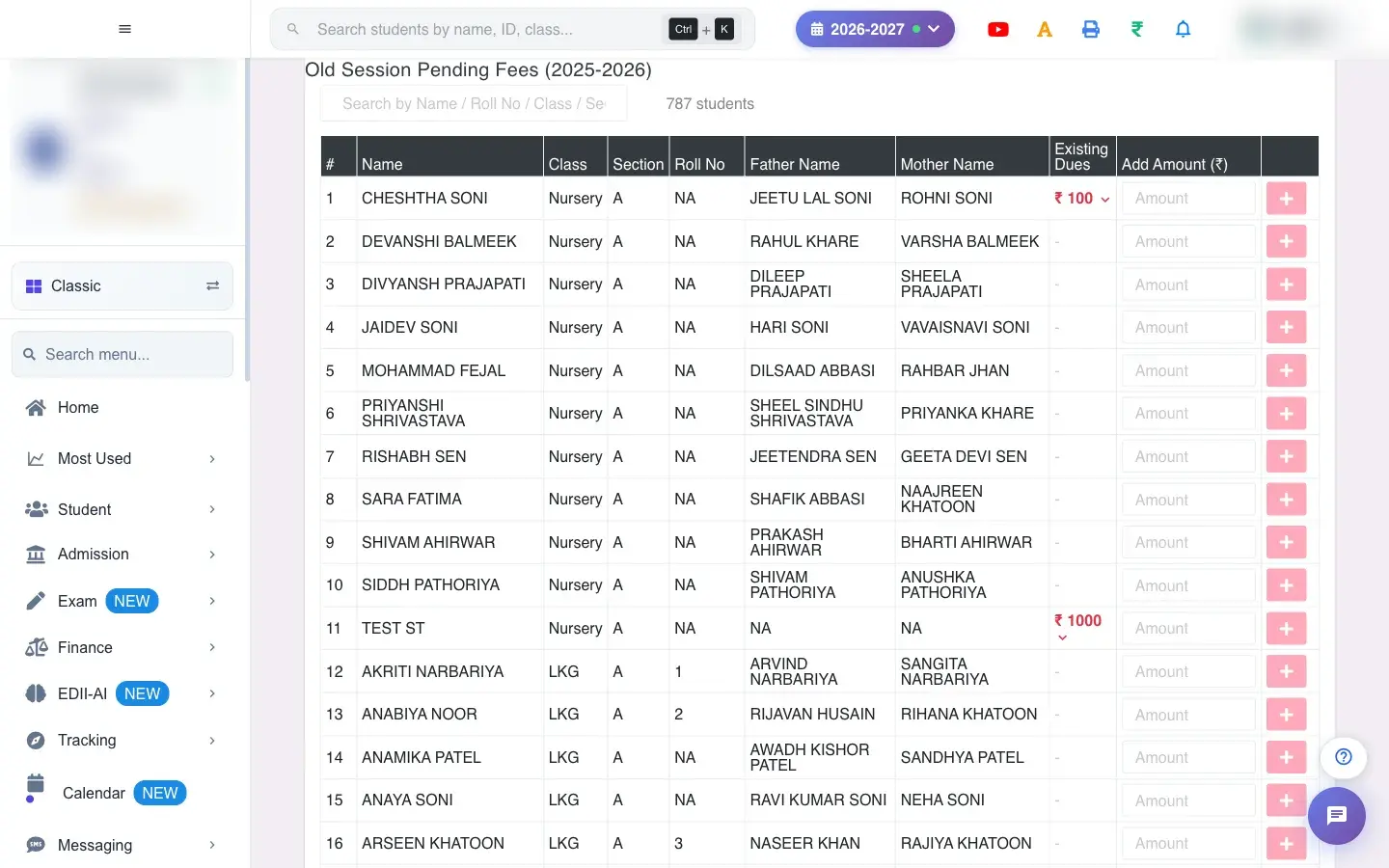
Old Session Pending Fees (Finance › Back Session Fees) records money students owed from a previous session so it can be collected now. The page lists every student with their Existing Dues and an Add Amount (₹) box. Enter an amount against a student to add an old-session fee entry for them.
Expanding a student’s dues shows each entry: Fee Name, Session, Total, Paid, Balance and Added By.
Who uses it and when
Section titled “Who uses it and when”The accountant uses it when a school moves to EDII and brings forward unpaid fees, or when an old due is found.
Before you start
Section titled “Before you start”- Know the student, the old session and the amount.
Where to find it
Section titled “Where to find it”- Menu: Finance › Back Session Fees
- Address:
/view/back-session-fees - If it is missing from your menu, your role does not include it. Ask your school admin.
 Open a bigger pictureतस्वीर बड़ी करें
Step by step
Section titled “Step by step”1. Find the student
Section titled “1. Find the student”Use Search by Name / Roll No / Class / Section to filter the list. The header shows the session and how many students are listed.
2. Read the existing dues
Section titled “2. Read the existing dues”Existing Dues shows the total already carried over for the student, in red when it is above zero. Open the row to see each entry.
3. Add an amount
Section titled “3. Add an amount”Type a valid amount in Add Amount (₹) and confirm. The message Old session fee added for <name> confirms it. A non-number shows Please enter a valid amount; a failure shows Error adding fee.
4. Delete an entry
Section titled “4. Delete an entry”The bin beside an entry removes it (Fee entry deleted for <name>). An entry that already has a payment cannot be deleted: Cannot delete: payment of Rs. … has been made.
Fields and filters
Section titled “Fields and filters”| Field | What it is | Notes |
|---|---|---|
| Search by Name / Roll No / Class / Section | Filter students. | Only filters the list. |
| Add Amount (₹) | An old-session due for the student. | Valid number. |
Buttons
Section titled “Buttons”| Button | What it does | What happens next |
|---|---|---|
| Add (amount) | Adds the old-session fee entry. | Existing Dues increases. |
| Delete (bin) | Removes an unpaid entry. | Not allowed once paid. |
Columns
Section titled “Columns”| Column | Meaning |
|---|---|
| Name / Class / Section / Roll No / Father Name / Mother Name | The student. |
| Existing Dues | Old-session dues so far. |
| Fee Name / Session / Total / Paid / Balance / Added By | Each old-session entry. |
After you save
Section titled “After you save”- The amount becomes an old-session due for the student, collectable on the fee counter and counted in defaulter reports.
- Deleting an unpaid entry removes the due.
Good to know
Section titled “Good to know”- An entry with a payment cannot be deleted.
- The amount must be a valid number.
Messages you may see
Section titled “Messages you may see”| Message | What it means | What to do |
|---|---|---|
| Old session fee added for <name> | The due was added. | Nothing to do. |
| Please enter a valid amount | Not a number. | Type a number. |
| Cannot delete: payment of Rs. … has been made | The entry was paid. | Leave it. |
| Fee entry deleted for <name> | Removed. | Nothing to do. |
- Add dues in one pass for the whole school, using the search to move quickly.
Stuck? Try this
Section titled “Stuck? Try this”| Problem | Likely cause | What to do |
|---|---|---|
| I cannot delete a due | A payment was made against it. | Only unpaid entries can be deleted. |
Did this page help?क्या इस पेज से मदद मिली?
Thanks! Glad it helped.धन्यवाद! अच्छा लगा कि काम बन गया।
Sorry about that. Ask in your own words, or write to us.माफ़ कीजिए। अपने शब्दों में पूछें, या हमें लिखें।