
Help homeहेल्प होम
How-to · Admin app
Act on alerts
किस पर ध्यान देना है
Work through the school's alerts and open the screen that fixes each.
2 steps2 स्टेप
यह पेज अंग्रेज़ी में है। कुछ समझ न आए तो ।
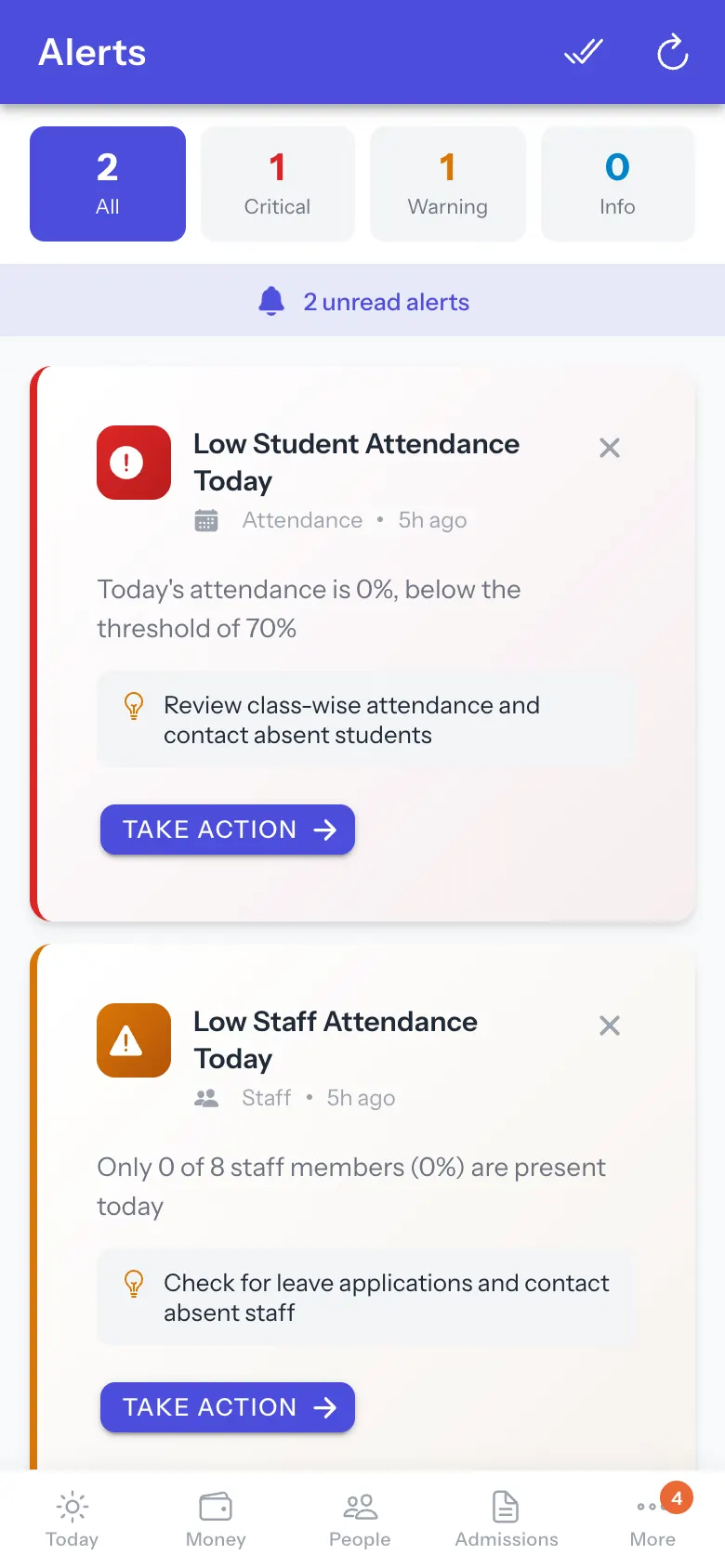
What needs you today (sections not marked, periods without cover, approvals) is on Today under Needs you now: start there. More › Alerts holds the school’s threshold alerts, such as attendance below the school’s limit, each with a suggested action and Take Action.
Before you start
Section titled “Before you start”- Alert thresholds are set by the school.
1. Read the alerts
Section titled “1. Read the alerts”Scan the list, critical first.
 Open a bigger pictureतस्वीर बड़ी करें
2. Act
Section titled “2. Act”Select Take Action to open the screen that deals with it.
Full details of this screen Act on alerts
Good to know
Section titled “Good to know”- Clearing all alerts cannot be undone.
Stuck? Try this
Section titled “Stuck? Try this”| You see | Why | What to do |
|---|---|---|
| An alert keeps coming back | The cause is not fixed. | Use Take Action. |
Did this page help?क्या इस पेज से मदद मिली?
Thanks! Glad it helped.धन्यवाद! अच्छा लगा कि काम बन गया।
Sorry about that. Ask in your own words, or write to us.माफ़ कीजिए। अपने शब्दों में पूछें, या हमें लिखें।