
Screen guide · Admin app
Dropout Risk
Machine-learning predictions of students who may drop out, by risk level and class, with the option to re-run the prediction and log an intervention.
यह पेज अंग्रेज़ी में है। कुछ समझ न आए तो ।
Dropout Risk shows counts Total At Risk, Total Students and numbers by Critical, High, Medium and Low, a Class breakdown, tabs ALL, CRITICAL, HIGH, MEDIUM, LOW and Predicted at-risk students with class, section, level and a percentage. LOAD MORE shows further students. Open a student for Student Risk Detail (Risk score, Risk factors) and Log intervention to record what was done (Intervention recorded). Re-run prediction asks Re-run dropout prediction? This can take a few minutes. and runs in the background.
Who uses it and when
Section titled “Who uses it and when”Principals and counsellors.
Before you start
Section titled “Before you start”- Attendance, marks and fee data feed the prediction.
Where to find it
Section titled “Where to find it”- Open More › Dropout risk (or All insights › Dropout Risk (ML)).
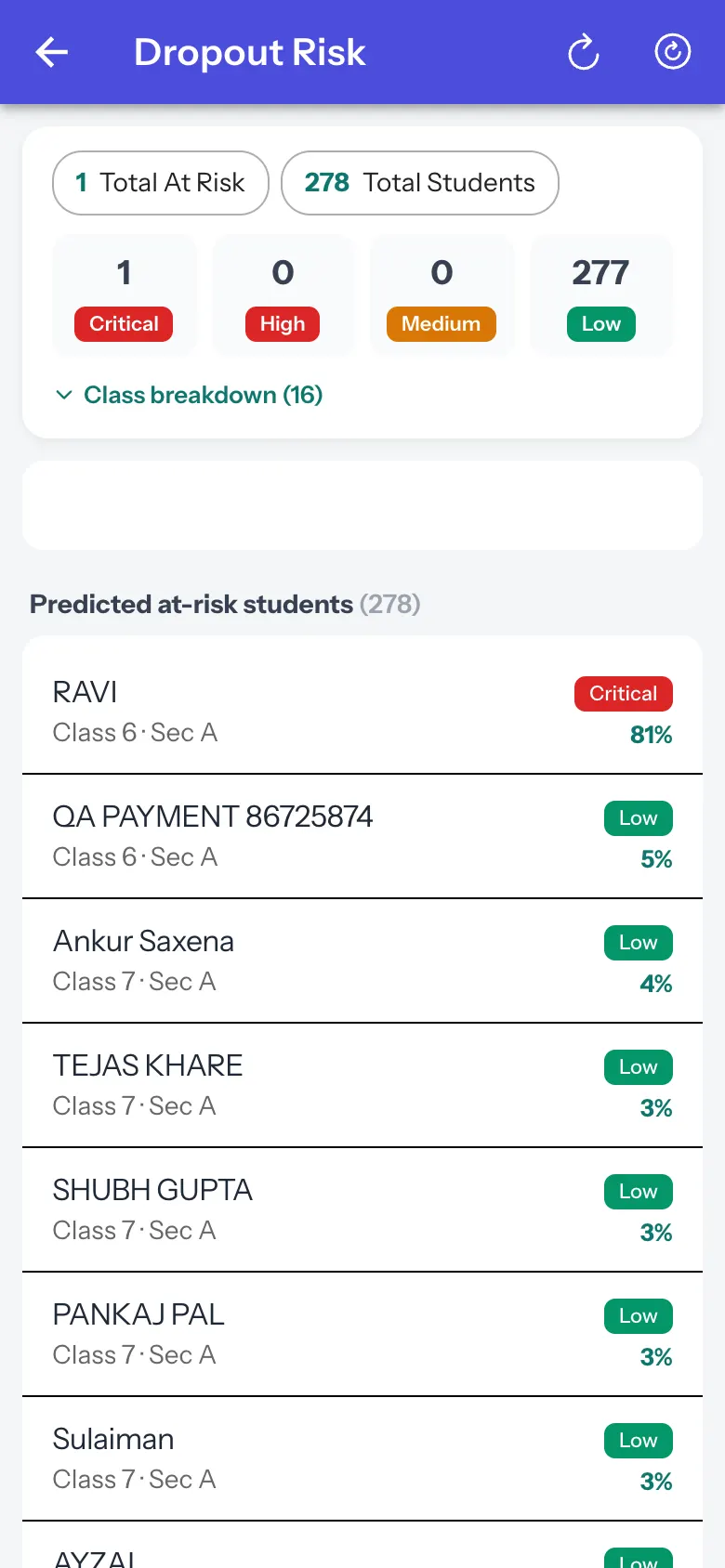 Open a bigger pictureतस्वीर बड़ी करें
Step by step
Section titled “Step by step”1. Filter by level
Section titled “1. Filter by level”Select CRITICAL, HIGH, MEDIUM or LOW.
2. Open a student
Section titled “2. Open a student”Read the risk factors and log an intervention.
3. Refresh the prediction
Section titled “3. Refresh the prediction”Select Re-run prediction and confirm.
Fields and filters
Section titled “Fields and filters”| Field | What it is | Notes |
|---|---|---|
| Intervention type | What you did (for example counselling, parent call). | Required (Please enter an intervention type). |
Buttons
Section titled “Buttons”| Button | What it does | What happens next |
|---|---|---|
| Re-run prediction | Starts a new prediction. | Prediction run started in the background. |
| Log intervention | Records an action for the student. | Intervention recorded. |
After you save
Section titled “After you save”- The intervention is saved against the student.
Good to know
Section titled “Good to know”- Predictions are guidance; verify with the school’s records.
Messages you may see
Section titled “Messages you may see”| Message | What it means | What to do |
|---|---|---|
| No students match this risk level. Try a different filter or re-run the prediction. | Nobody at that level. | Change the filter. |
| No detailed risk factors available for this student. | Detail is missing. | Check the student’s records. |
| Prediction run started in the background. This can take a few minutes. | Running. | Check again later. |
- Log every intervention so progress is visible.
Stuck? Try this
Section titled “Stuck? Try this”| Problem | Likely cause | What to do |
|---|---|---|
| Many Low students | The model lists everyone with a score. | Focus on Critical and High. |
Did this page help?क्या इस पेज से मदद मिली?
Thanks! Glad it helped.धन्यवाद! अच्छा लगा कि काम बन गया।
Sorry about that. Ask in your own words, or write to us.माफ़ कीजिए। अपने शब्दों में पूछें, या हमें लिखें।