
How-to · Web app
Create an AI exam
Let EDII's AI draft a test and review it.
यह पेज अंग्रेज़ी में है। कुछ समझ न आए तो ।
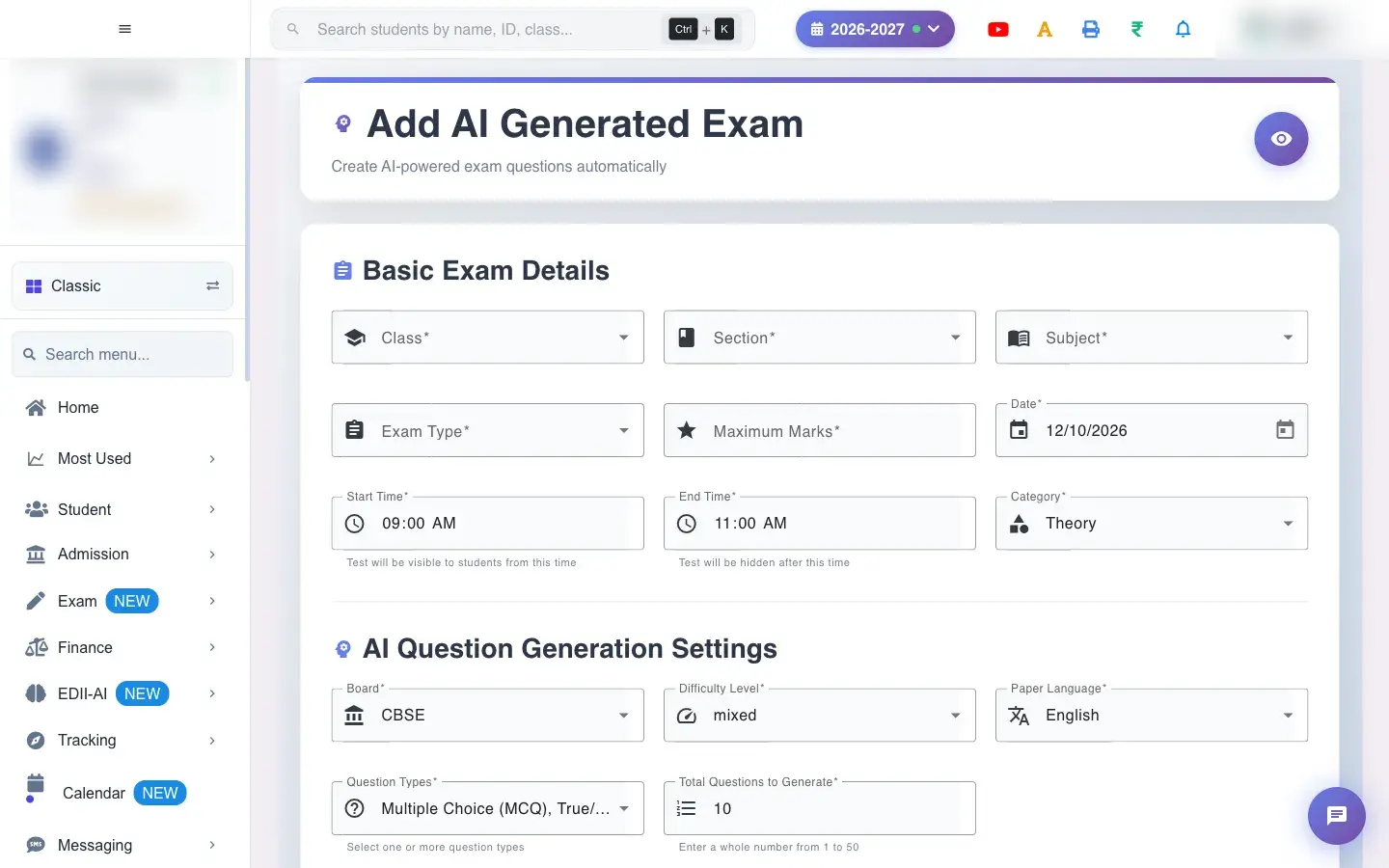
Add AI Generated Exam (Exam › Add) builds a test automatically. In Basic Exam Details you choose the Class, Section, Subject, Exam Type, Category (for example Theory), Maximum Marks, Date and the Start Time and End Time. In AI Question Generation Settings you choose the Board (for example CBSE), Difficulty (for example mixed), Language, the Question Types (Multiple Choice, True/False, Theory long answer and more) and Total Questions to Generate. Under Topics you add the topics the questions should cover.
Before you start
Section titled “Before you start”- The class must have subjects (Subjects Unavailable For The Class Selected otherwise) and the school must have exam types set up (Configure in School Academic Details if none).
1. Basic exam details
Section titled “1. Basic exam details”Choose the class, section, subject and exam type. If exam types do not load you see Exam types could not be loaded with Retry; if none are configured, No exam types are configured. Ask a school administrator to add one. Enter the maximum marks, the date and the start and end time. The category sets whether it is Theory or Practical.
 Open a bigger pictureतस्वीर बड़ी करें
2. Generation settings
Section titled “2. Generation settings”Choose the Board, Difficulty, Language and the Question Types; at least one is required (Select at least one question type style messages guide you). Enter Total Questions to Generate.
3. Topics
Section titled “3. Topics”Type a topic and Add Topic, or pick topics from the curriculum with Select All and Add all. The questions are drawn from these topics.
4. Generate
Section titled “4. Generate”Select Generate AI Exam. If something is missing you see Please correct: …. On success: Test Successfully Added! AI is generating questions — live progress is shown on this page. When done: All questions generated! PDFs are ready on the View AI Tests page.
5. Copy an earlier test
Section titled “5. Copy an earlier test”You can start from an earlier AI test’s settings (Test configuration copied! You can now modify and create a new test.).
Full details of this screen Create an AI exam
What happens next
Section titled “What happens next”- A test is created and the AI writes the questions in batches; you can leave the page and a notification arrives when it is ready.
- Teachers should review the questions with Quality Check before the test is used.
Good to know
Section titled “Good to know”- Class, section, subject, exam type, marks, date and times are required.
- At least one question type is required.
Stuck? Try this
Section titled “Stuck? Try this”| You see | Why | What to do |
|---|---|---|
| Generation failed for some questions | A batch did not finish. | Open View AI Tests and retry generation. |
Did this page help?क्या इस पेज से मदद मिली?
Thanks! Glad it helped.धन्यवाद! अच्छा लगा कि काम बन गया।
Sorry about that. Ask in your own words, or write to us.माफ़ कीजिए। अपने शब्दों में पूछें, या हमें लिखें।