
Help homeहेल्प होम
How-to · Teacher app
Create an online class
Schedule a meeting for a class.
3 steps3 स्टेप
यह पेज अंग्रेज़ी में है। कुछ समझ न आए तो ।
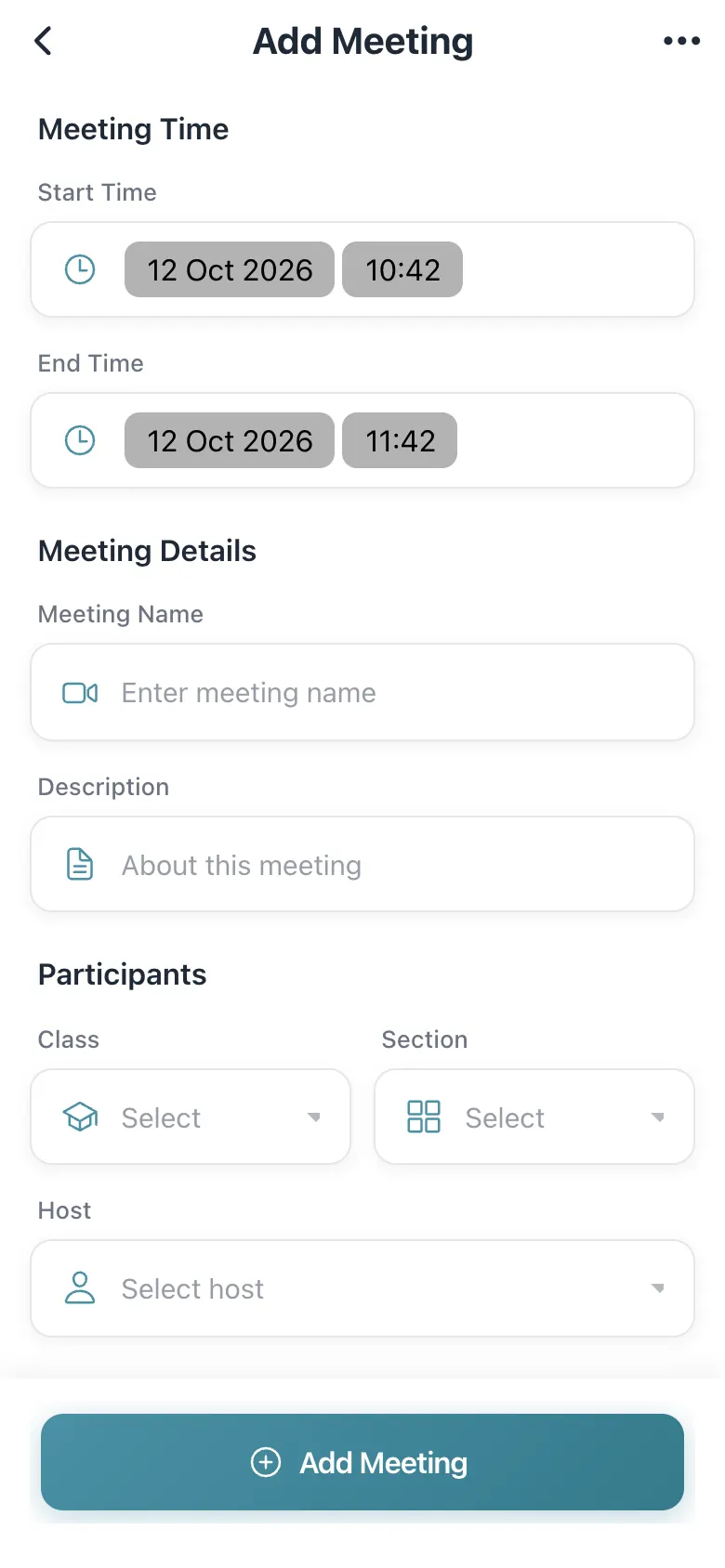
Add Meeting has Meeting Time (Start Time, End Time) and Meeting Details (Meeting Name, Description, Participants: Class, Section and Host). Save to create it (Success!). It then appears under Meetings and students can join from their app.
Before you start
Section titled “Before you start”- Know the class, section and time.
1. Set the time
Section titled “1. Set the time”Choose start and end time.
 Open a bigger pictureतस्वीर बड़ी करें
2. Fill the details
Section titled “2. Fill the details”Name it, choose class, section and host.
3. Save
Section titled “3. Save”Create the meeting.
Full details of this screen Create an online class
What happens next
Section titled “What happens next”- The meeting appears in View Meetings and in the students’ calendar.
Good to know
Section titled “Good to know”- Name, time, class, section and host are required.
Stuck? Try this
Section titled “Stuck? Try this”| You see | Why | What to do |
|---|---|---|
| Students cannot join | Wrong class or section. | Edit the meeting. |
Did this page help?क्या इस पेज से मदद मिली?
Thanks! Glad it helped.धन्यवाद! अच्छा लगा कि काम बन गया।
Sorry about that. Ask in your own words, or write to us.माफ़ कीजिए। अपने शब्दों में पूछें, या हमें लिखें।