
Help homeहेल्प होम
Screen guide · Teacher app
Schedule
A hub for time-based tasks: create or view meetings, view the timetable, My Day, My Calendar and the fees report.
1 step1 स्टेप
यह पेज अंग्रेज़ी में है। कुछ समझ न आए तो ।
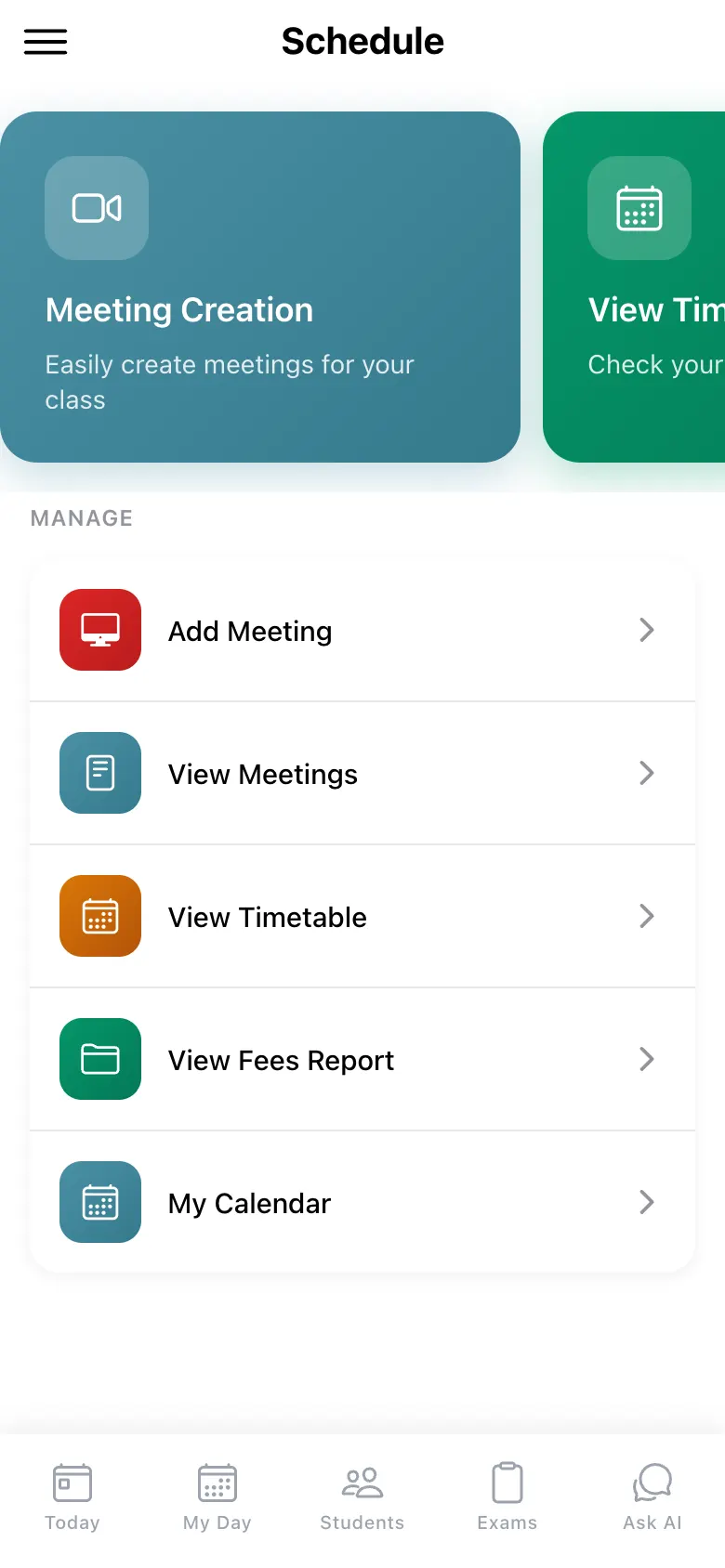
Schedule has three cards: Meeting Creation (Easily create meetings for your class), View Timetable (Check your class schedule) and My Day (Today’s periods + assignments). Under MANAGE: Add Meeting, View Meetings, View Timetable, View Fees Report and My Calendar.
Who uses it and when
Section titled “Who uses it and when”Teachers who plan meetings.
Before you start
Section titled “Before you start”- Nothing.
Where to find it
Section titled “Where to find it”- Choose Schedule in the menu (☰).
 Open a bigger pictureतस्वीर बड़ी करें
Step by step
Section titled “Step by step”1. Pick an action
Section titled “1. Pick an action”Select a card or a MANAGE entry.
After you save
Section titled “After you save”- This screen only shows information.
- Use Add Meeting for an online class.
Did this page help?क्या इस पेज से मदद मिली?
Thanks! Glad it helped.धन्यवाद! अच्छा लगा कि काम बन गया।
Sorry about that. Ask in your own words, or write to us.माफ़ कीजिए। अपने शब्दों में पूछें, या हमें लिखें।